Now available on the App Store
20+ meetings.
Zero data entry.
Your CRM is updated and follow-up emails drafted before you leave the venue. No typing, no data entry, no Sunday-evening admin.

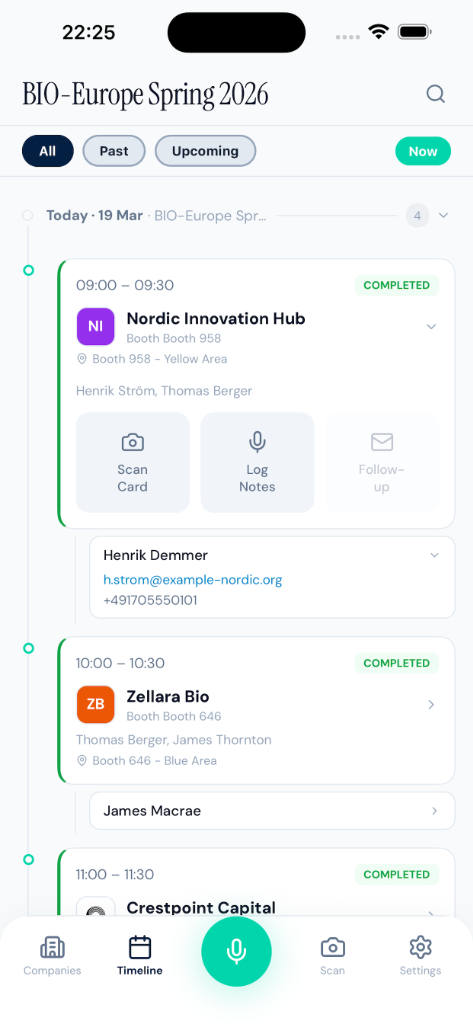
Your CRM is updated and follow-up emails drafted before you leave the venue. No typing, no data entry, no Sunday-evening admin.
 Outlook
 GMail
GMail Salesforce
 HubSpot
 Pipedrive
 Excel
ExcelFrom your first meeting to your last follow-up — every step of the BD conference workflow, covered.
Dictate a 2-minute summary between meetings. The AI turns it into a structured note with outcomes, action items, and next steps — tied to the right contact and company.
Snap a photo of any badge or business card. The AI extracts name, title, company, and email — and ties the contact to the right meeting in your schedule. No manual typing.
Push structured meeting notes and contact records to Salesforce or HubSpot in one tap. No manual field-by-field entry. Your CRM is up to date before you leave the venue.
One tap generates a draft follow-up in your Gmail or Outlook, grounded in your meeting notes. Ready to send when you're back at your desk — not two weeks later.
Import your partneringONE ICS file or BIO Partnering Excel schedule. Every meeting fills in with company name, contact, title, and booth location — before the conference starts.
From conference conversation to CRM-ready follow-up in minutes.
Have the conversation — planned or spontaneous. Lanyrd uses your schedule when available, and works just as well for meetings that weren't on the calendar.
Right after the conversation, dictate your notes, scan a badge or business card, or both — in whatever order works for you.
The app turns your notes into a structured meeting record: who you met, what was discussed, action items, and next steps. If anything is unclear, it asks you to confirm.
Sync the contact and meeting note to Salesforce or HubSpot in one tap. Your follow-up draft lands in Outlook or Gmail — ready to send when you're back at your desk.
No "book a demo." No procurement. Sign up, start your free trial, and decide after your first conference.
Still on the fence? These come up a lot.
No. Transcription apps give you a wall of text. Lanyrd gives you a structured meeting note, a CRM contact, and a draft follow-up email — from a 2-minute voice note. You'd still need to manually extract and enter everything from a transcript.
Because you're still filling in every field by hand. Lanyrd captures via voice, structures the data, and syncs it — you just dictate. No manual entry, no context-switching between apps at the conference.
Yes. Sign up online, pay by card, start the same day. No IT ticket, no procurement process. Under €150 per conference — straightforward to expense.
Your notes are never used to train AI models, and your personal data is never shared. We do use anonymised, aggregated patterns — stripped of all identifying information — to understand industry trends and improve the product.
One recovered lead covers the cost for years. At €79/event, you're spending less than a conference dinner to eliminate 8–16 hours of post-conference admin — and to ensure your follow-ups actually go out while the conversations are still warm.
Each conference pass gives you an 8-week access window around the event. After that, your data stays safe — you keep read-only access to your notes and contacts. To regain full editing and sync capabilities, you can purchase a new pass or switch to an annual plan at any time.
All communication between the app and our servers is encrypted in transit using TLS/HTTPS. Data is stored on Supabase, a SOC 2 Type II certified infrastructure hosted on AWS. AWS location is Frankfurt (EU).
No. Lanyrd uses the OpenAI API to generate notes and emails. Your data is never used to train the underlying model — this is excluded by default under OpenAI's API usage policy. You can read more at platform.openai.com/privacy.
Download Lanyrd and never lose a meeting note again.
Need Team tier or interested in future conferences?